Webflow vs WordPress for B2B SaaS in 2026: Hosting, Cost, SEO and When to Choose Each

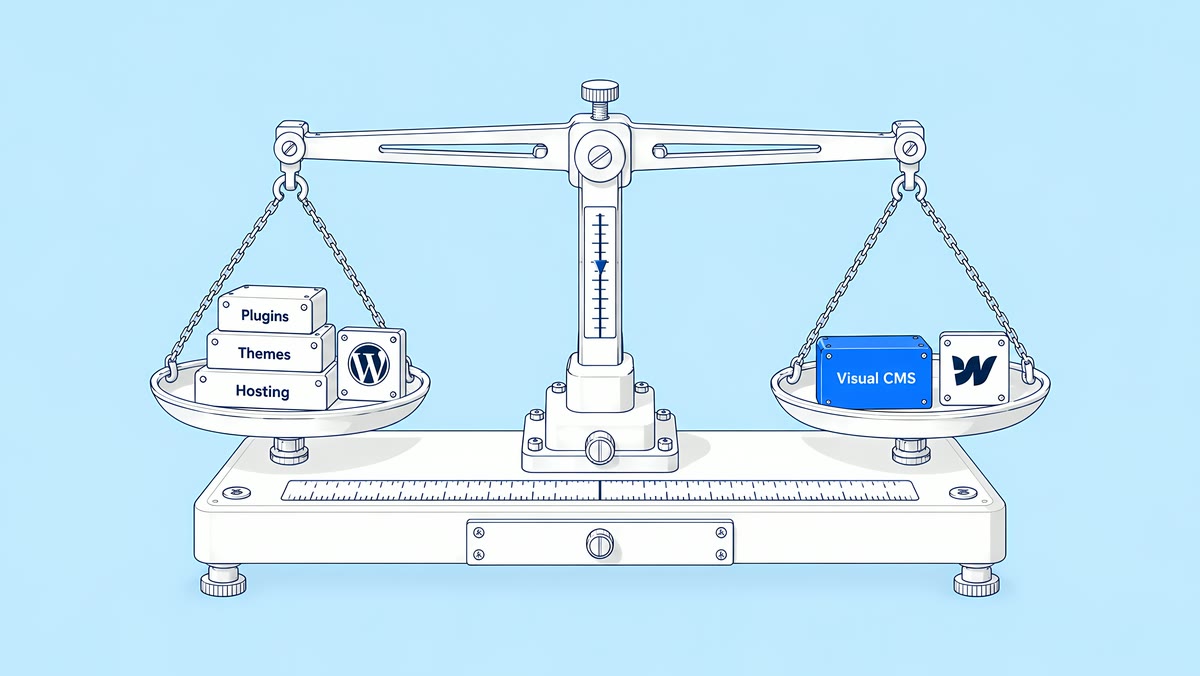
For a B2B SaaS marketing site that marketers update every week, Webflow leaves less for your team to maintain: hosting, security updates, SSL and the CDN come with the Site plan, and editors work in a visual CMS. WordPress is the better choice when the site needs server-side features, plugins you depend on, control of your own hosting, or many editors without per-seat fees. On subscriptions alone, a lean WordPress setup can cost less than Webflow; the bigger difference is who does the upkeep.
Last updated 27 October 2026. Prices are list prices in USD from each vendor's own page, checked that day. They change, so confirm them before you budget.
This comparison covers the open-source WordPress software, self-hosted or on a managed WordPress host, against Webflow. ActiveSet builds on Webflow, so read it with that in mind. We have kept the cases where WordPress is the better pick, and the WordPress costs come from the vendors, not from us.
How do Webflow and WordPress compare at a glance?
| Area | Webflow | WordPress |
|---|---|---|
| What it is | A hosted visual builder, CMS and hosting service, paid per site and per seat | Open-source software licensed under the GPLv2, installed on hosting you choose |
| Hosting and updates | Included in the Site plan; Webflow runs the updates | You or your host update WordPress core, plugins, themes and PHP |
| Editing | Visual Designer for builders; Limited seats for content editors | Block editor, and the Site Editor on block themes; six pre-defined user roles |
| Content limits | Premium: 20,000 CMS items, 40 Collections, 300 static pages | Set by your hosting, database and how the site is built |
| Extending it | Built-in features, plus embeds, integrations and custom code | Over 76,000 free plugins in the WordPress.org directory, premium plugins and custom code |
| SEO controls | Built in: titles, meta descriptions, canonicals, sitemap, robots.txt, schema, 301 redirects | Core settings plus SEO plugins |
| Cost model | Site plan, seats and optional add-ons | Hosting, premium plugin and theme licences, and developer time |
How do hosting and security differ?
WordPress.org describes WordPress as built on PHP and MariaDB. Its requirements page recommends PHP 8.3 or greater, MySQL 8.0 or MariaDB 10.11 or greater, and HTTPS. Its security guide (updated 14 October 2026) says the most important step is keeping WordPress and every installed plugin and theme up to date, and that the hosting environment matters as much as the software.
A managed WordPress host takes on part of that work. WP Engine's Essential plan, for example, lists managed WordPress, PHP and MySQL, daily backups, free SSL, security patching and plugin risk scans, with automatic plugin and theme updates as an optional add-on. Choosing plugins, testing updates and fixing conflicts still sits with you, your developer or whoever you pay for that add-on. Some fixes also sit below WordPress itself: our PHP2Shell guide covers a current PHP flaw that updating WordPress alone does not fix.
Webflow is a hosted service. Its hosting page says there are no updates to run, packages to install or capacity to plan, every Site plan includes SSL/TLS, and DDoS and bot protection come through its CDN provider. Its security page lists SOC 2 and ISO 27001. That is Webflow's description of its own product. It does not cover your account permissions, third-party scripts, custom code or connected tools, which you still own. The trade-off is control: a Webflow site with a working CMS runs on Webflow's hosting, not on your own servers.
Which is easier for the marketing team?
WordPress is not limited to a plain text editor. On a block theme, the Site Editor manages templates, template parts and styles, and WordPress has six pre-defined user roles, from Super Admin to Subscriber. Adding users costs nothing beyond your hosting. What editors can safely change depends on the theme and blocks your developer sets up.
Webflow charges per seat. On yearly billing, a Limited seat for editing content or building pages with components is $15 a month, a Full seat for design and admin is $39, reviewers are free, and every Workspace includes one Full seat for its owner. Our Webflow pricing guide breaks down the full bill. As with WordPress, someone has to prepare the components and editing boundaries before handover.
Test the real work on both: publish a case study, build a campaign page from existing sections, change a navigation item and fix a meta description. If routine tasks still need a developer, check whether the cause is the platform, training or the way the site was built.
How far does each CMS scale?
Webflow's limits are set by plan. Premium includes 20,000 CMS items, 40 Collections, 300 static pages and 120 requests a minute on the content management API. The Team plan ($2,500 a month, annual contract) raises Collections to 100 and static pages to 500, and Enterprise limits are custom. Reference fields per Collection are capped too; our guide to planning for Webflow CMS limits covers each cap.
WordPress stores content in your own MySQL or MariaDB database. Developers model content types with custom post types and taxonomies, often with a custom-fields plugin. How far it scales depends on your hosting and how the queries are built, not on a plan tier.
Structured data can also live outside the CMS. On peakxv.com, portfolio and company data sync from Airtable into the Webflow CMS through Whalesync (see the Peak XV case study).
Plugins or built-in features: what replaces what?
The table lists functions a B2B marketing site commonly needs. On WordPress they come from plugins or the host; Webflow includes many of them in the Site plan.
| Need | Typical on WordPress | On Webflow |
|---|---|---|
| SEO fields, sitemap, schema | An SEO plugin, such as Yoast SEO (Premium $118.80 a year, excluding VAT) | Built in: metadata, canonicals, sitemap, robots.txt and llms.txt, schema markup |
| Custom fields | A plugin such as ACF PRO ($49 a year for one site), or custom code | Collection fields, including reference and multi-reference fields |
| Forms | A plugin such as Gravity Forms (Basic $59 a year for one site, with a HubSpot add-on) | Native forms with unlimited submissions on Basic and Premium; CRM forms by embed or integration |
| Redirects | A plugin or host rules | Native 301 redirects, with CSV import and wildcards |
| Caching and CDN | Your host or a caching plugin | Included global CDN |
| Gated content | Membership plugins | No native option since Webflow retired User Accounts on 29 January 2026; third-party tools instead |
| Online shop | WooCommerce | Separate Ecommerce Site plans |
Each WordPress plugin is one more thing to update, and WordPress's own auto-updates documentation says to keep plugins and themes on their latest version to stay secure. On Webflow, embeds and third-party scripts are the equivalent: fewer of them, but still yours to maintain.
Which platform is better for SEO and AEO?
Neither platform guarantees rankings or AI citations. Both need useful content, accessible pages, accurate metadata, sensible internal links and a publishing process that catches errors. Webflow has the core controls built in; WordPress gets most of them from an SEO plugin. Audit the final pages rather than counting settings in an admin panel.
Google's guidance on AI features and your website says there are no additional requirements or special schema.org markup needed to appear in AI Overviews or AI Mode. Moving platforms will not fix an article that repeats another page, lacks evidence or does not answer the reader's question.
Which is faster?
Webflow's hosting page describes a global CDN, HTTP/2 and HTTP/3 support and automatic image optimization. On WordPress, speed depends on your host, theme, plugins and caching setup. Third-party scripts, consent tools, fonts and video affect speed on both platforms, so compare like with like. Compare representative pages carrying the same images, fonts, consent tools and tracking. A lightweight demo site does not predict how your production marketing stack behaves.
What does each cost in 2026?
| Line | Webflow, yearly billing | WordPress |
|---|---|---|
| Software | Part of the Site plan | Free (GPLv2) |
| Hosting | Premium Site plan $25 a month ($39 billed monthly); Basic $15 for sites without a CMS | WP Engine Essential from $28 a month billed annually; Kinsta Single 20GB $35 a month, or $350 a year |
| People | Limited seat $15, Full seat $39 a month; owner's Full seat included; reviewers free | No per-user fee |
| Extras | Optional: Core $19 or Growth $49 Workspace; Localize, Analyze, Optimize, bandwidth | Premium plugins and themes, such as Yoast SEO Premium, ACF PRO and Gravity Forms |
WP Engine notes that its first-year pricing applies to new Essential customers and that renewal pricing can change, so budget on the renewal price you will pay.
A worked example for a five-person marketing team on yearly billing. On Webflow: Premium at $25 plus four Limited seats at $15, with the owner on the included Full seat and a free Starter Workspace, is $85 a month, or $1,020 a year. On WordPress: Kinsta Single 20GB at $350 a year, plus Yoast SEO Premium ($118.80), ACF PRO ($49) and Gravity Forms Basic ($59), is $576.80 a year. On these list prices WordPress is about $1,330 cheaper over three years, before anyone's time.
Time can outweigh the subscriptions: the hours a developer spends on updates, plugin conflicts and routine page requests, against the hours your team spends building pages in Webflow. Our 3-year cost model for Webflow, WordPress and headless lets you add your own hours and rates.
When is WordPress the better choice?
- The site is partly an application. E-commerce on WooCommerce, memberships and logins, booking logic, directories or calculators that run on the server.
- You rely on specific plugins and rebuilding their features elsewhere would cost more than maintaining them.
- You need to control hosting, for example to run on your own infrastructure or a host your security team has approved.
- Many people publish. Dozens of contributors cost nothing extra on WordPress, while each Webflow editor needs a seat.
- You already have WordPress developers and a publishing workflow that works. If the site does its job, a move is not automatically an improvement.
- Content will outgrow Webflow Premium (20,000 items or 40 Collections) and Team or Enterprise pricing does not fit.
When is Webflow the better choice?
- Marketers publish every week and are waiting on a developer for pages they could build from components.
- You would rather pay a subscription than own hosting, patching and plugin updates.
- The site is a marketing site, with forms, a blog, case studies and landing pages, and integrations handle the rest.
- Content fits Premium's limits, or you are ready to plan for Team or Enterprise.
What does moving from WordPress to Webflow involve?
Webflow's migration overview says there is no automated way to convert a site from another platform: moving to Webflow is a rebuild, not a transfer. The work is a URL inventory, a redirect map, rebuilt templates, imported content, carried-over metadata, retested forms and analytics, and monitoring after launch. Webflow sets no hard limit on redirects but recommends 1,000 at most and wildcard rules for patterns, which matters for large WordPress blogs. Google's site move guide says to keep redirects for at least a year and that most pages of a small or medium site can take a few weeks to move in search. Our WordPress to Webflow migration checklist has the full step list.
Related Webflow work from our case studies. None of these was an ActiveSet WordPress migration, but each shows a part of the job:
- Peak XV. Another agency moved peakxv.com and surge.peakxv.com from WordPress to Webflow. ActiveSet took both sites over in May 2026, moved them, the Airtable base and Whalesync into Peak XV's own accounts, ran a pre-launch audit with priority fixes, and launched both after the DNS cutover in June 2026. See the Peak XV case study.
- Happier. We rebuilt the Ten Percent Happier marketing site in Webflow in 2024 across about ten templates, including a courses CMS migration, the podcast and blog migration, and 301 redirect mapping. It launched in August 2024 (Happier case study).
- Tessell. Not a WordPress site: tessell.com was built in React. In 2023 we moved it to Webflow, with pages tied to Tessell's backend moved to an app subdomain behind 301 redirects. tessell.com has since moved off Webflow, a reminder that the right platform depends on what a team needs at the time (Tessell case study).
For small WordPress sites, our 3-day WordPress to Webflow migration has three fixed tiers: Express (up to 5 pages, one CMS collection of up to 50 items, one form), Standard (up to 10 pages, two collections and 150 items, up to 3 forms), and Code, a static Astro build instead of Webflow. ActiveSet publishes fixed prices for its 3-day migration tiers on the 3-day migration page. Every tier includes a 1:1 301 redirect map, metadata and schema parity, and 30 days of fixes. E-commerce, memberships, multilingual sites, custom plugin features, redesigns and complex animations are outside the fixed tiers: those, and larger sites, get a custom quote through our website migration service, typically 1 to 3 weeks.
How does ActiveSet approach Webflow vs WordPress?
ActiveSet is a Webflow Premium Partner based in Bangalore, India, with 100+ Webflow projects. We build on Webflow, and on Astro for teams that want code, so we are not neutral. That is why the cost example above uses vendor list prices and the WordPress cases are listed in full. If a site depends on features outside the 3-day caps, such as e-commerce, memberships or custom plugin logic, it is scoped as a custom project after the URL inventory, not squeezed into a fixed tier.
Sites we build are built in, or moved to, the client's own Webflow Workspace, with editor guides or short recorded walkthroughs at handover, so the marketing team owns the site and pays Webflow directly.
Disclosure: ActiveSet is a Webflow Premium Partner and earns a commission from Webflow on Webflow plans. The Webflow plan prices in this post are Webflow's own list prices; other prices come from the sources listed.
Weighing a move? Book a call with ActiveSet with your current site's URL and the features it depends on, and we will tell you which route fits.
Sources
- Webflow, Plans & pricing, checked 27 Oct 2026
- Webflow, Hosting, checked 27 Oct 2026
- Webflow, Security, checked 27 Oct 2026
- Webflow Help Center, Updated pricing and simplified plans for May 2026, updated 31 Aug 2026, checked 27 Oct 2026
- Webflow Help Center, Seats, roles, and permissions overview, updated 5 Oct 2026, checked 27 Oct 2026
- Webflow Help Center, Collection fields, updated 30 Jun 2026, checked 27 Oct 2026
- Webflow Help Center, User Accounts sunset, updated 25 Feb 2026, checked 27 Oct 2026
- Webflow Help Center, Migrate your site to Webflow overview, updated 16 Jul 2026, checked 27 Oct 2026
- Webflow Help Center, How do I set up redirects in Webflow?, updated 8 Sep 2026, checked 27 Oct 2026
- Webflow Help Center, How do I export my Webflow site code?, updated 31 Oct 2025, checked 27 Oct 2026
- WordPress.org, About, checked 27 Oct 2026
- WordPress.org, Requirements, checked 27 Oct 2026
- WordPress.org, Plugins directory, checked 27 Oct 2026
- WordPress Developer Resources, Security, updated 14 Oct 2026, checked 27 Oct 2026
- WordPress.org Documentation, Plugin and theme auto-updates, updated 13 Jan 2023, checked 27 Oct 2026
- WordPress.org Documentation, Site Editor, updated 14 Sep 2026, checked 27 Oct 2026
- WordPress.org Documentation, Roles and capabilities, updated 2 Sep 2026, checked 27 Oct 2026
- WP Engine, Plans & pricing, checked 27 Oct 2026
- Kinsta, Pricing, checked 27 Oct 2026
- Yoast, Yoast SEO Premium, checked 27 Oct 2026
- Advanced Custom Fields, ACF PRO, checked 27 Oct 2026
- Gravity Forms, Pricing, checked 27 Oct 2026
- Google Search Central, AI features and your website, updated 10 Dec 2025, checked 27 Oct 2026
- Google Search Central, Site moves with URL changes, updated 20 Aug 2026, checked 27 Oct 2026
We're a Webflow Premium Partner with 100+ Webflow projects. Book a free 30-minute call to talk through scope and timeline, and we'll follow up with a written quote.
Frequently Asked Questions
Only partly. Webflow's code export needs a paid Workspace plan, not just a Site plan, and the exported code leaves out CMS content and functionality and form processing; site search and forms stop working on exported sites. CMS Collections can be exported separately as CSV files. In practice, leaving Webflow is a rebuild, the same as arriving.
Anyone who edits content or builds pages from components needs a Limited seat, listed at $15 a month on yearly billing; designers and admins need a Full seat at $39. Every Workspace includes one Full seat for its owner and 100 free reviewer seats for people who only view and comment. Freelancer and Agency Workspaces also include client seats per site. Prices checked 27 Oct 2026.
Webflow sells separate Ecommerce Site plans, listed at $29 (Standard), $74 (Plus) and $212 (Advanced) a month on yearly billing, checked 27 Oct 2026. Whether one replaces a WooCommerce store depends on your catalogue, payments and fulfilment, so compare against Webflow's feature list first. Webflow's site add-ons, such as Localize and Analyze, are not available on Ecommerce Site plans.
On ActiveSet's 3-day migration, a small site within the tier caps takes 3 business days, counted after a Day 0 scoping call and URL inventory. Sites over the caps, or with e-commerce, memberships or multiple languages, get a custom quote and typically take 1 to 3 weeks. After launch, search engines still need time to process the moved URLs.
Yes. The new site is built and reviewed on Webflow staging while WordPress keeps serving visitors, and the switch happens at the DNS cutover once you approve launch. Agree a content freeze from the start of the build until launch, so nothing published on WordPress in the meantime is lost.